Build-scoped Token
The Build-scoped Token feature lets builds automatically obtain a short-lived VCS access token. This token is issued through an existing VCS connection and stored in a specified parameter. Build steps can then use this token to access and modify resources in the VCS.
At the moment, tokens can only be issued via a GitHub App connection.
Token Parameters
- Repository scope
Tokens are fine-grained and grant access only to repositories explicitly listed in the build feature settings. Creating a global token with access to all repositories of a user or organization is not supported.
- Time to live
A token is valid for up to 60 minutes and automatically expires when the parent build (or build chain) completes. If a build runs longer than one hour, the token may expire before being used. Currently, tokens cannot be refreshed during a build.
- Permissions
Token permissions are defined by the issuing App. For example, a GitHub App connection created in Automatic mode uses an App with the following permissions:
contents: write
metadata: read
pull_requests: read
issues: read
members: read
emails: read
statuses: write
checks: write
Feature Settings
To configure the Build-scoped token feature, specify the following properties:
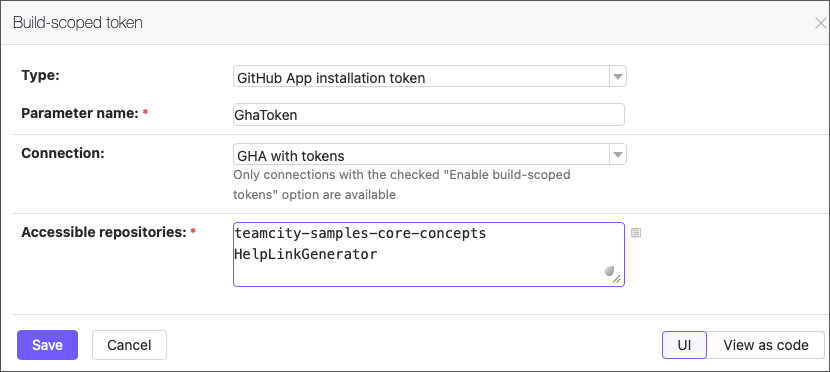
- Type
The token type. Currently, only GitHub App tokens are supported.
- Parameter name
The name of the parameter that stores the issued token. TeamCity clears this value after the build finishes and masks it to prevent exposure (for example, in build logs).
- Connection
The TeamCity VCS connection used to issue the token. GitHub App installation tokens can only be created using a GitHub App connection with Enable build-scoped tokens enabled.
- Accessible repositories
A newline-separated list of repositories that the token can access.
The following example shows how to configure this feature using Kotlin DSL:
Example
This example demonstrates how to use the Build-scoped token feature to send an authorized GitHub REST API request that creates a pull request.
Create a project with an unbound build configuration. Without a configured VCS root, it cannot access repositories directly, so all interactions must use a manually issued token.
Open project settings and navigate to the Connections settings tab.
Create a new GitHub App connection (ensure Enable build-scoped tokens is selected).
By default, the App created in step #3 has the
pull_requests: readpermission. Since tokens inherit the App’s permissions, you must extend them to create pull requests.Go to https://github.com/settings/apps and click Edit next to the App linked to your TeamCity connection.
Open the Permissions and events section and expand Repository permissions.
Set Pull requests to "Read and write".
Click Save changes.
Confirm the updated permissions in your account or organization settings: go to https://github.com/settings/installations, click Review request, and then Accept new permissions.
Open configuration settings and navigate to the Parameters settings tab.
Create a parameter to store the issued token.
Open the configuration’s Build Features tab and add the Build-scoped token feature.
Parameter name: type the name of the parameter created in step #6.
Connection: choose a connection created in step #3.
Accessible repositories: specify the repository where the pull request will be created.
Add the Command-line build step that sends a
POSTrequest to the/repos/{owner}/{repo}/pullsendpoint.Run a build. If configured correctly, the build log will include the response describing the created pull request.
The following Kotlin DSL sample shows the complete setup: